
Keep up with the world of privacy and security
Sign up for our newsletter and stay informed. Get yourself highlights and the latest news from the world of internet privacy and cybersecurity!
We just sent you a confirmation email
Open it, follow the instructions inside and you’ll soon be getting our newsletter.
Keep up with the world of privacy and security
Sign up for our newsletter and stay informed. Get yourself highlights and the latest news from the world of internet privacy and cybersecurity!
We just sent you a confirmation email
Open it, follow the instructions inside and you’ll soon be getting our newsletter.
12 MIN READ | Last updated: Jan 20, 2024 | By Kristi Hansen
Are you looking for a website, but it doesn’t appear in your search results? That can happen often, and it boils down to your domain name system (DNS) server. Internet service providers (ISPs) or government entities might configure the DNS server to block specific websites. That’s why you keep getting irrelevant search results.
The issue goes beyond internet freedom to affect your online privacy and security.
The situation isn’t hopeless, though. You can easily change your DNS server to access your favorite sites and make your browsing experience snappier, more private, and secure.
You’ll wonder why you didn’t change your DNS sooner!
Let’s define what a DNS does and what issues you face with your ISP’s default DNS server.
Did you watch The Unforgivable on 108.175.32.0/20? You understood the movie’s name, but how about Netflix’s IP address? That’s why you need a DNS.
A Domain Name System (DNS) matches human-friendly domain names to computer-friendly IP addresses.
When you type in a domain name like cyberghost.com, for example, your web browser sends the request to your ISP via your router. Your ISP refers the request to its default DNS server. The DNS server then supplies the relevant IP address so your browser can load the appropriate page.
A DNS also saves a local copy or cache of sites you’ve recently visited on your device for quick and easy reference.
It seems like a streamlined service; what could go wrong? Check the following reasons why you should change your DNS.
By default, your device relies on your ISP’s DNS servers to handle these requests, but you have plenty of other DNS services to choose from, like Cloudflare, Cisco OpenDNS, or Google Public DNS. These public DNS servers have a number of advantages over your ISP’s DNS servers.
When you change your DNS, you speed up your browsing experience. If your ISP-supplied DNS servers are slow or it hasn’t configured them properly for caching, your connection will be slower. Switch to another DNS and you’ll likely enjoy faster loading and lower ping, especially during data-heavy tasks like gaming or streaming.
Your ISP’s DNS isn’t necessarily secure. DNS services are vulnerable to multiple cyber attacks.
Have you heard of cache poisoning? That’s when cybercriminals redirect your DNS requests from legitimate sites to malicious phishing sites. These sites masquerade as real sites to fool you into submitting your login credentials or financial information.
What about distributed denial-of-service (DDoS) attacks? Cybercriminals launch Distributed Denial of Service (DDoS) attacks against the DNS itself or hijack the DNS to launch DDoS attacks on other systems. A DDoS attack overwhelms a site’s servers with requests, so legitimate traffic can’t get through. This assault of requests can cause the DNS systems and sites to crash.
Your ISP may try to monetize your search activity by selling it to advertisers who use it to target you with personalized ads or search results. ISPs may also divert your unresolved search queries to search engines or advertiser sites. That’s a blatant privacy breach, but that doesn’t stop your ISP from doing it.
ISPs use their DNS servers to block sites for various reasons. They may be trying to make their service more family-friendly. Alternatively, they may be obligated to block sites to adhere to government content filtering or censorship laws. When you change your DNS from the one your ISP gives you, you can get around censorship and access your favorite sites.
Specialized third-party DNS providers can offer many useful features. Some allow you to set parental controls to keep age-inappropriate content off your children’s devices. If you’re a business owner or school network admin, changing your DNS helps you filter out work or school-inappropriate content.
Better speeds, less censorship, more security and privacy, and a range of useful features… Now that you know why you should change your DNS, here’s how.
You’ll find many reliable third-party DNS providers to choose from, offering different features and benefits. The most common, as mentioned, are Google DNS and Cloudflare.
Google Public DNS offers a secure, fast, and free alternative to your ISP’s DNS. Web infrastructure giant Cloudflare’s DNS is even faster than Google’s and far faster than your ISP’s. It’s also more secure and private too. Unlike most DNS resolvers, Cloudflare doesn’t sell your data to advertisers and deletes all logs every 24 hours.
Make a note of these IP addresses and enter them when you’re ready to change to the new DNS server.
For Google DNS: 8.8.8.8 or 8.8.4.4
For Cloudflare: 1.1.1.1 or 1.0.0.1
To change your DNS manually on your device, follow the step-by-step instructions below. Easier still, download the CyberGhost VPN app. CyberGhost gives you instant access to a safe, private, and fast DNS without complicated setup on both mobile and desktops.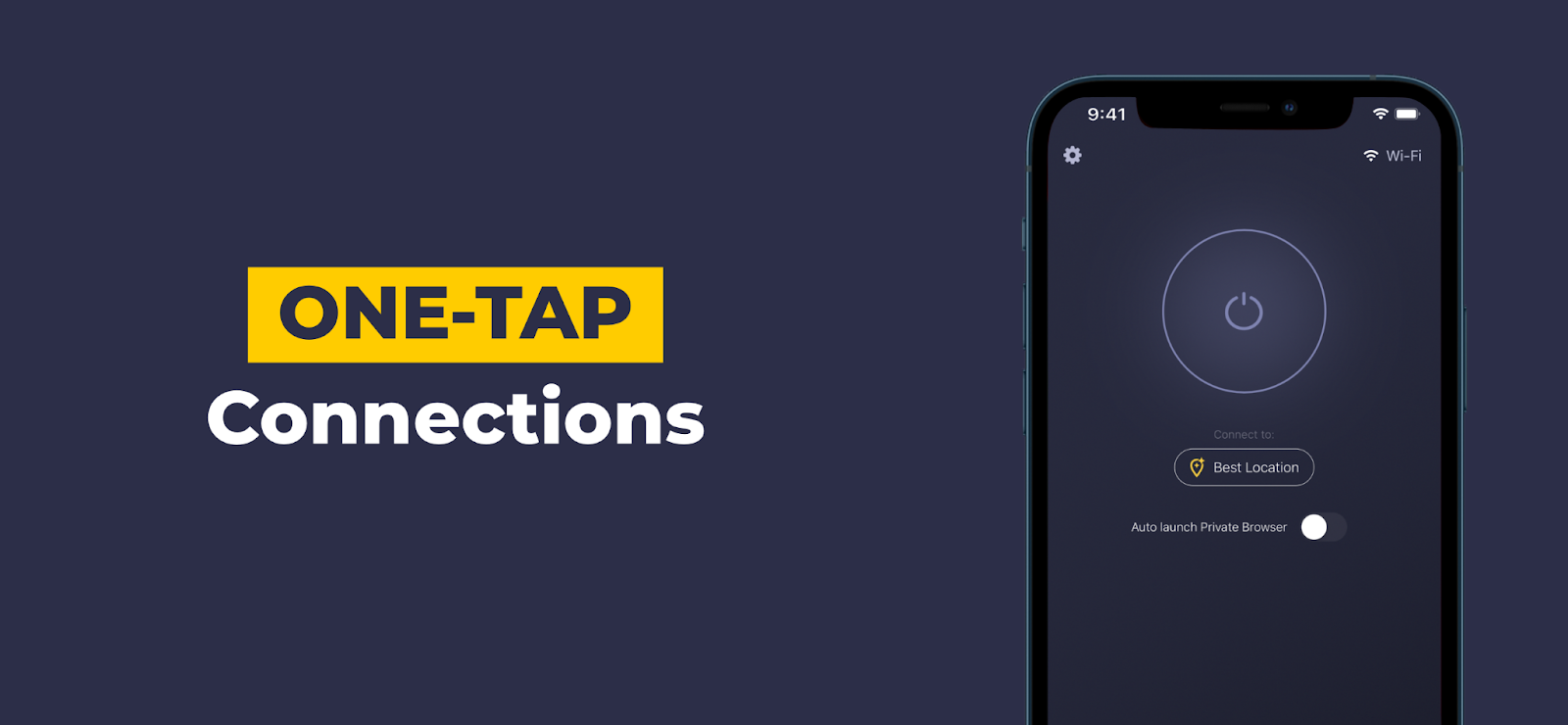
Follow these 11 steps to change your DNS in Windows 10: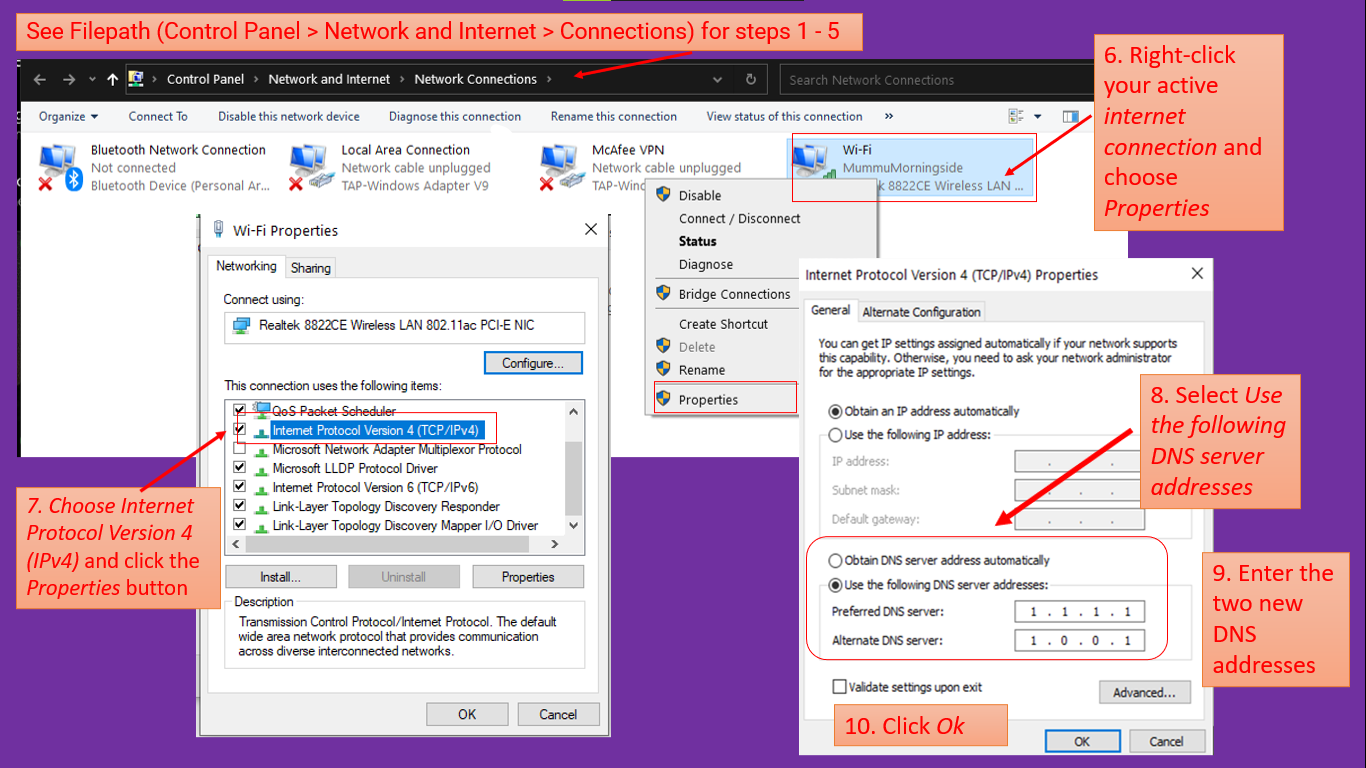
Here’s how to change your MacBook’s DNS server in just 7 steps:
Routers differ in configuration, but generally speaking, it takes 6 steps to change your DNS:
Linux takes a little technical know-how, but you can change your DNS in 3 steps:
Follow these 4 steps to change DNS servers on a Chromebook:
Smart TVs are all a little different but here’s how you can change your DNS servers on an Android TV:
iOS is easier than macOS for DNS changes. Simply follow these 5 steps: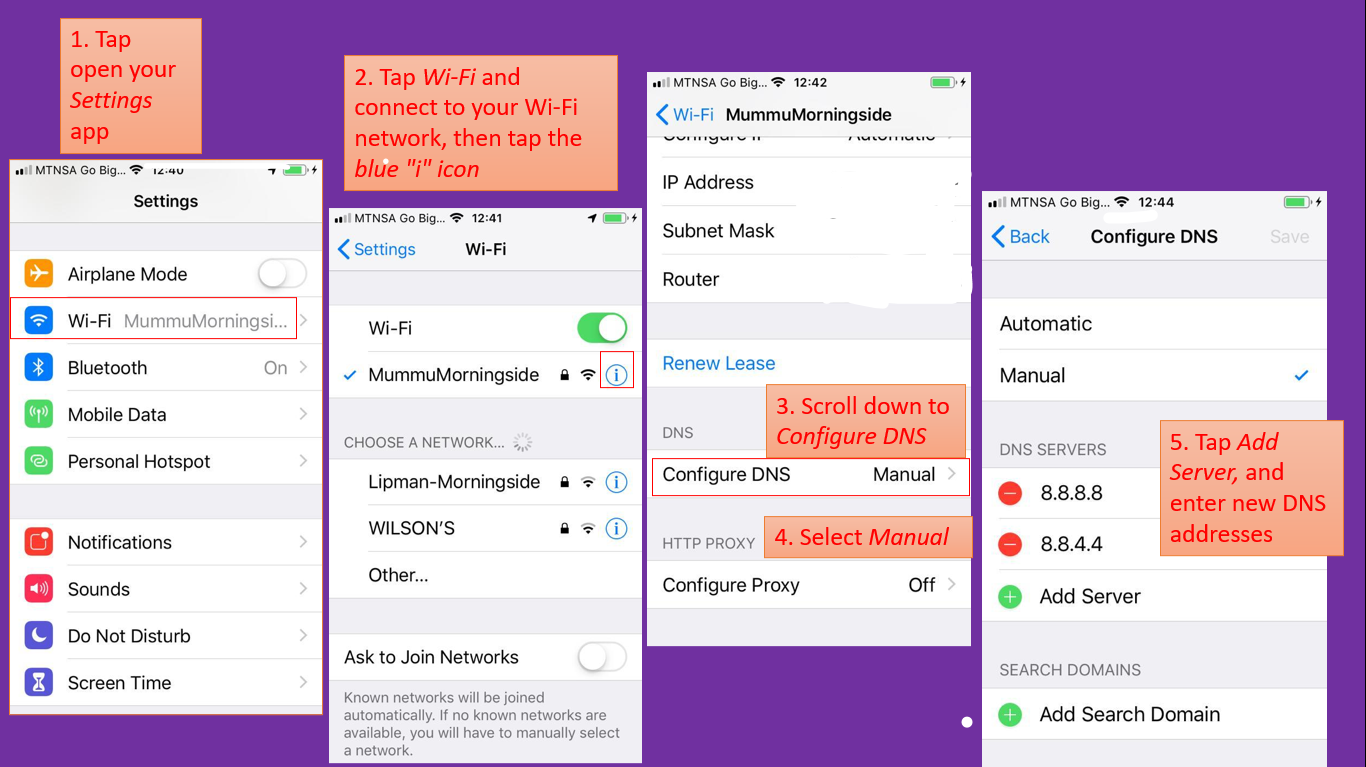
You also have 5 steps to follow to change your DNS on Android:
For mobile devices you’ll have to change your DNS settings every time you connect to a new Wi-Fi network. Alternatively, you could buy a Smart DNS app for a more permanent change.
In that case, you’re probably better off paying for a VPN subscription. It costs a little more, but the advanced security features more than make up for it.
A Smart DNS service replaces your ISP’s DNS address with one from a different provider. That prevents websites from turning you away since they detect a different location. It doesn’t give you a new IP address — it only changes how a website sees your IP address.
You might be able to visit a variety of previously unavailable websites, but your Smart DNS connection is not secure, nor encrypted. That means ISPs, cybercriminals, and governments can still snoop around and watch your every move.
A virtual private network (VPN) lets you connect to the internet via an encrypted tunnel. Unlike a DNS, a VPN changes your IP address and hides your data through advanced encryption. Most good VPNs also include DNS protection and take over DNS request handling from your ISP.
What if you could have the best of both? A number of premium VPN providers, like CyberGhost include a SmartDNS service as part of their subscription, allowing you to reap the benefits of both.
CyberGhost VPN comes with a highly user-friendly SmartDNS option. If you want speed, privacy, security and to keep visiting the websites you like, you can’t go wrong with CyberGhost VPN.
ISP throttling and sluggish DNS servers cramping your style? CyberGhost VPN offers you the fastest VPN servers available and we constantly upgrade our global server network to maintain high speeds. You also get unlimited bandwidth!
Break free from your ISP’s overreaching control. CyberGhost VPN gives you a new IP address so you can hide your online activity and enjoy a borderless and limitless internet experience.
Our strict No Logs policy means we never record or store any data on your online activity. Even if anyone requests data on you, we have nothing to give! You are free to surf the web without leaving a trace.
If you simply want to visit streaming websites and aren’t as worried about privacy or security, try our Smart DNS feature. It even works with Smart TVs that don’t natively support a VPN, like the Samsung SmartTV with Tizen OS. With our SmartDNS service, you’ll be able to keep watching streaming services like Netflix and Hulu, even if you’re not at home.
If your VPN connection ever shuts down, no worries! CyberGhost VPN’s automatic Kill Switch kicks in and cuts your internet traffic until you regain your VPN connection. Your IP address, location, and all your information benefits from improved protection.
Don’t let DNS leaks give the game away! A leak can happen if your operating system accidentally restores the default DNS settings. That exposes your activity to your ISP and anyone else watching. Activate CyberGhost VPN’s DNS leak protection feature and protect yourself from accidental exposure.
Your DNS server is your gateway to the internet, but it also controls your overall surfing experience, privacy, and security. When you change your DNS, you regain control and improve your connection.
That said, a VPN with a Smart DNS feature does all that and more. It encrypts your data so cybercriminals, governments, and ISPs can’t see it. You also benefit from improved online security as your real IP is masked. You can freely surf the worldwide web while taking your privacy and security to the next level.
Download CyberGhost VPN and get all the security features you need to safeguard your digital life. 1 CyberGhost VPN subscription keeps your identity and data safe across all your devices.
Yes, but only if you switch to trusted DNS servers. The most popular public DNS providers are Cloudflare and Google DNS. You’re safer online when you change your DNS with a VPN, though, since you’ll keep ISPs, third parties, and cybercriminals from spying on your private browsing data.
Consider CyberGhost VPN. We’ll shield your online identity with end-to-end security on all your devices.
A DNS changer app changes your DNS from the default settings (your ISP’s DNS servers) to a third-party DNS address. That’ll improve your browsing speed and your security. That said, it doesn’t encrypt your data and you’re still a target for snoopers.
A VPN app like CyberGhost can offer better protection. CyberGhost VPN offers you superfast worldwide servers, a Smart DNS feature, a fail-proof Kill Switch, automatic Wi-Fi protection, and much more. Get CyberGhost VPN now and try it risk-free with our 45-day money-back guarantee.
It directs your DNS requests from your ISP’s DNS servers to third-party DNS servers. That means the third-party DNS will translate a domain name like cyberghost.com into a numerical IP address, not your ISP’s DNS.
Changing your DNS can improve your security, give you a speed boost, and gives you the ability to visit previously restricted websites. Contact our 24/7 Customer Support if you need any help changing your DNS.
A DNS leak occurs when your VPN or Smart DNS fails and your DNS requests get routed back to your ISP. Your private browsing data is now exposed.
To check if you have a DNS leak, take our privacy test. You can easily prevent DNS leaks with CyberGhost DNS leak protection. Download CyberGhost VPN and protect up to 7 devices with just 1 subscription.
Kristi has been tracking the latest advances in technology for over a decade. She’s known for compiling useful tips and hacks to help people stay safe online. Aside from being a gifted napper, she’s probably the most talented Netflix binge-watcher you’ll find.
Your email address will not be published. Required fields are marked*
About The Author



More Stories
Global Encryption Day Summit 2026: Five Key Conversations on the Future of Digital Trust
What Global Data Tells Us About the Economics of IXPs
We Shouldn’t Have to Give Up Our Safety Online to Be Safe