
In the last article, I wrote about how to harden Windows. One of the items I mentioned briefly was to use an encrypted DNS service, which will be covered here in more detail. The providers are incredibly easy to use and it provides a lot of extra protection when browsing the web.
Encrypted DNS can be broken down into two areas – DNS over HTTPS (DoH)/DNS over TLS (DoT) and DNS Security Extensions (DNSSEC). Any good provider will have both of these, as they work together and it wouldn’t make sense to use one without the other. These service providers have the ability to block malicious domains, as well as a couple types of attacks. This will all be covered in this letter.
This will be broken down into the following sections:
MoustachedBouncer Attack
Protection Against Attacks
Threat Intelligence
Encrypted DNS Providers
MoustachedBouncer Attack
This attack was part of a state sponsored hack of several embassies in Belarus. I’ll give the cliff notes here. If you want to know more about the details, the security researchers at ESET did a great investigative piece in the link I gave.
This hack happened at the ISP level, likely with involvement from intelligence agencies. Embassies were most likely chosen due to the large amount of classified documents that go through them, which is something that could’ve been a big help for Russia, considering the current world affairs. What happens in embassies is an interesting topic if you want something else to look in to.
As the researchers pointed out, the attackers were able to make Windows think it was behind a captive portal. If you’re not familiar with those, it’s the screen you see when you sign on to the internet at places like motels and it usually shows the terms of service that you have to agree to. In the case of this attack, Windows went to msftconnecttest[dot]com/redirect. This is where the attackers were able to redirect Windows machines to go to a Windows update URL that looked real, but was the door to get malware on the machines. The important quote to highlight here is, "Both the DNS resolutions and the HTTP replies were injected in transit, probably at the ISP level."
Being that this was a targeted and sophisticated attack, it represents a worst case scenario for many people, but I’ll be mentioning this attack later on when I’m giving examples. Long story short, this attack likely could have been prevented with a properly configured VPN (which would have included encrypting DNS traffic).
Protection Against Attacks
The first thing to mention here is that encrypted DNS gives a tiny boost to privacy – and every little bit helps. A lot of DNS traffic is still unencrypted and it allows the ISP to see what websites you’re visiting. Because they can see the DNS traffic, it’s a simple process for them. If DNS traffic is encrypted, they won’t be able to tell from that traffic, but the IP addresses you connect to will still be visible, which will still be an indication of what sites you visit.
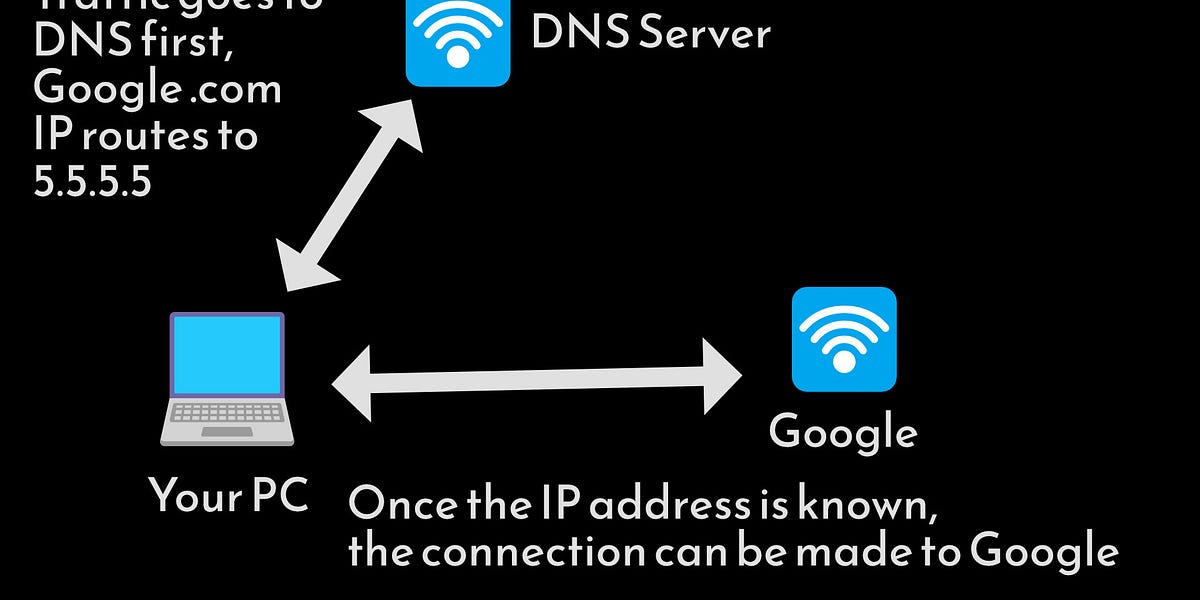
The photo I put together is incredibly simple, but shows the basics. DNS is basically a phone book. No one would be able to use the internet if they had to type IP addresses in the search bar rather than domain names. When a request is sent to a DNS server, it just says what the IP address for the site is so your browser can then connect to that site.
This leads to the issues with unencrypted traffic. When the traffic is unencrypted, it allows the attacker to put themselves in the middle. With a man-in-the-middle attack, an attacker could easily see what websites someone visits on a regular basis and then craft an attack around that.
Now comes the next part – cache poisoning. An attacker can use this to make a DNS resolver return a malicious IP address to the victim, which gives an opportunity to either capture login details through a fake website or get the victim to download malware.
This is where encryption and DNSSEC play their parts. The encryption aspect can’t protect against something like cache poisoning. It encrypts the traffic, but it doesn’t know the IP for Google is supposed to be 5.5.5.5 (real) instead of 4.4.4.4 (fake – also, these IPs are made up for my examples). With encryption alone, you could still get sent to a malicious IP. DNSSEC allows for verifying that the IP address that’s being sent to you is actually the correct one for the domain you’re trying to visit. Remember that like anything else with infosec, nothing is ever 100% secure.
As far as DoT and DoH (there’s also DoQ for the super inquisitive), both are good options. While there’s more differences than the following, I’ll keep it simple – DoH gets mixed in with normal HTTPS traffic, which is good from a privacy standpoint. Other than that, both work great from a security standpoint. The details of each could get us in the weeds, so I’ll leave those out.
Threat Intelligence
I mentioned at the start that encrypted DNS providers can block malicious domains. This is done mostly through threat intelligence providers, as the encrypted DNS providers use data from them. There’s a lot of them and they usually provide other services – some of the providers include CrowdStrike, Cisco, and Mandiant. These providers usually share their data with other infosec companies about threats.
Let’s say a hacker makes repeat attempts to get into a system protected by Cisco. The firewall detects the suspicious activity coming from the IP address(es) and blocks them. These IPs can then be added to blocklists that get rolled out to anyone using a Cisco firewall, and also to other people who get this intel from Cisco. If you wanted an example of something for consumer usage, have a look at CrowdSec. They operate the same way. If someone tries to attack a computer protected by the service, CrowdSec will block the attacker IP for everyone else that uses their service.
There are also threat intelligence analysts that work for these companies. It’s an entire specialty that’s part of the infosec industry. These people will look at data surrounding threat groups, breaches, malware, etc, make reports about their findings, and share those.
Encrypted DNS Providers
There’s many providers, though my top recommendations would be dns0 (for EU citizens), NextDNS (owners of dns0), ControlD, and Quad9. Here’s an excellent study which showed the effectiveness of them. For example, with 51,507 malicious domains, ControlD blocked all but 32. Since these providers function as the DNS resolver (which I showed in the photo above), they have the ability to block (not resolve) to domains that’re malicious.
Each of the providers has slight differences, so I recommend checking them out before making a decision. When Nexxwave did their tests, they focused on services that didn’t require an account to use, which is why dns0 was there but NextDNS wasn’t. ControlD can be used without an account, but will require you to make one if you want to change the blocklists to suit your needs. Keep in mind the privacy aspect if you decide to use an account. If you want plug-and-play functionality and never want to use an account, dns0 and Quad9 are excellent options.
They can also block against things that aren’t explicitly a threat, but have a high chance of being one. For example, dns0 blocks newly registered domains. These are domains that’re less than 30 days old. Sometimes they’ll be used legitimately, but a lot of bad actors will maliciously use a new domain right away, it’ll get blocked, then they register something else and repeat the process.
Each of these providers will have instructions on how to use their services. For most people, the easiest option will be through your browsers, which will require configuration for each one. You can also set it up through your router or through the operating system level. My preference has been through the OS. It encrypts all DNS traffic, but is easy to toggle off in the ultra rare event there’s something legit getting blocked. When I mentioned the MoustachedBouncer attack earlier, that’s a case where encrypted DNS would have been a benefit. It’s also good even in simple cases, such as connecting to coffee shop wifi (which you can’t know for sure isn’t an evil twin router).
The owner of the router or an attacker with access to the router could force DNS traffic to go to a malicious resolver. Since many browsers still have DoH set to off (which means using the default DNS provider), that means that computer would then be vulnerable. To be clear, with things like free wifi, I always recommend using a VPN instead, but encrypted DNS could be an okay alternative.
Wrapping Up
Encrypted DNS with good blocklists is a great way to help block malware. It’s easy to set up and can be done on just about any device or browser. The benefits far outweigh the few minutes it takes to go to your computer or browser settings to configure it.
That’s it for this letter. Have a good weekend and I’ll see you next Saturday! 🍻
No posts
Ready for more?
About The Author



More Stories
Global Encryption Day Summit 2026: Five Key Conversations on the Future of Digital Trust
What Global Data Tells Us About the Economics of IXPs
We Shouldn’t Have to Give Up Our Safety Online to Be Safe