
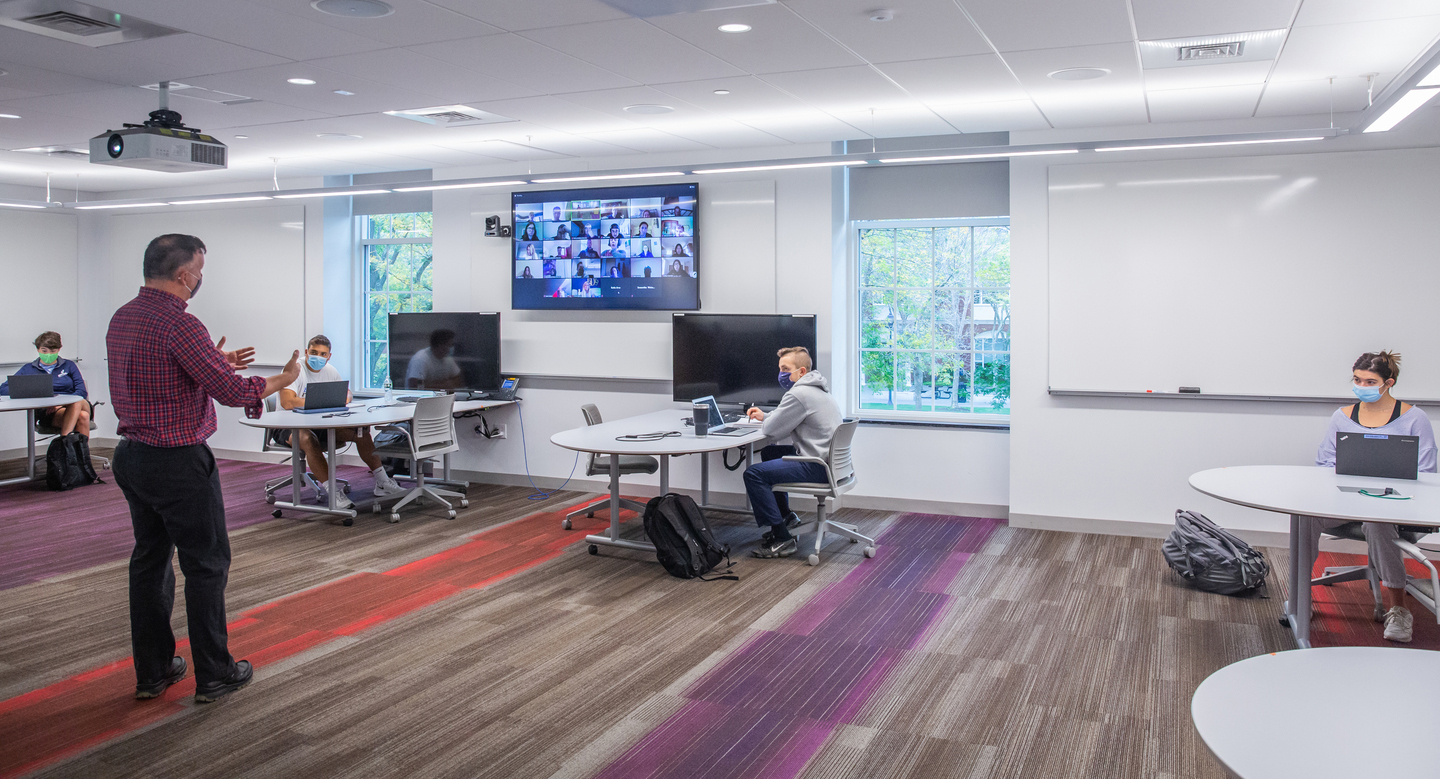
Hybrid learning at Bentley University is not a new concept. In fact, we have been delivering courses in this format for 20 years. The hybrid model we adopted was one where students can choose to participate and engage in real-time on-campus class sessions, in-person or remotely via Zoom. The added technology infrastructure in the traditional classroom and the ‘white-glove service’ support placed around this model, ensured that students received an enhanced learning experience. Prior to the pandemic, 15 of our 69 classrooms were equipped with technologies like auto tracking-cameras, 85-inch smartboards, ceiling microphones, and a large LCD display positioned on the back wall for faculty to view remote participants.
85-inch Smartboard for digital whiteboard and annotation
Tracking camera
Ceiling mics for in-class and remote student interactions and wireless mic for faculty
LCD Screen on back wall to view remote students
In April 2020, with uncertainty looming around the return to campus for Fall 2020, we were facing two problems:
To solve these two problems, we started to think about scaling our existing hybrid model. This meant a) adding infrastructure in remaining non-hybrid classrooms and the more challenging one, b) scaling our ‘white-glove service’ for faculty to teach in this environment. Our ‘white-glove service’ included student technology assistants in each hybrid course who would assist faculty in their classrooms, senior technology assistants remotely monitoring 3-4 simultaneous course sections and full-time staff training faculty and supporting operations around the hybrid class – managing students, classroom recordings, A/V assistance, etc.
Knowing that we would have a reduced presence of students on campus and the recruitment challenges we would face with hiring students for the large number of courses, we set-up two proof-of-concepts for our next-gen hybrid classrooms, one where we would not have a student technology assistant present in the classroom. Our goal was to come up with an innovative design, that would serve as a self-sufficient model.
Our proposal for this project started on April 13, 2020. For our proof-of-concept, we equipped two classrooms with slight variations in classroom A/V technologies and invited 19 faculty for a test-drive. After observing faculty and listening to their valuable feedback, we identified four challenges to overcome for a successful launch:
Before the proof-of-concept, our plan was to upgrade and add technologies in our non-hybrid classrooms (54). Given the challenges mentioned above and the need to provide a self-sufficient model, we decided to upgrade our existing A/V infrastructure in all 69 classrooms in addition to the necessary technologies for hybrid learning.
We contracted with CAVT Solutions, LLC our A/V Integrator who began the project on May 26th with a team on-campus managing and working on various parts of the install and programming phases.
Our decision to upgrade our A/V infrastructure, also came with a substantial change in how we did things. We decided to move to a network-based A/V infrastructure which would provide our support staff (Campus Presentation Technologies) the ability to monitor and troubleshoot equipment remotely. Our Network Services team played a significant role in making sure our network was equipped and in place to support this goal.
Outside of IT, our construction and planning team provided much needed support for completing all building infrastructure construction related to installing equipment, electrical, and other aspects needed to complete the project.
Working Teams
Goal
Assessing writing surface capabilities and implementation of touch screen monitors
– Faculty can start using it as naturally as possible
– Provide necessary training
– Figure out the issues that could come up so that is incorporate in the training and documentation
– Go through all use cases for how faculty will be using this
GUI (Graphical User Interface) design for touch control panel
– Collaborate with faculty to finalize the wireframe for the touch panels replacing the AMX touch panels
Podium image and setup time
-Work towards reducing the number of steps for the faculty to get started
– Get podium image ready for fall
– Lanschool for Collaboratory rooms
Training & documentation
– Setup workshop format, content, and dates
– Publish documentation on the AT website
– Create necessary videos
Establishing a support model for classroom support
– Determine the # of resources needed to provide support for start of class
– Define process for when help button is pressed
– Need for TAs etc.
Course recordings during class time & use of Blackboard delivery
Define the process for faculty to record their class sessions and eventually add the recording in Bb.
Actual installation and readiness of the classroom with equipment, etc.
Removal and recycling of existing equipment – procedure and locations
Classroom readiness
Actual installation and readiness of the classroom with equipment, etc.
Removal and recycling of existing equipment – procedure and locations
Quality check
Make sure the classroom A/V and support system are working according to current standards.
Upon completion of installation of the equipment, our Senior Support Technicians conducted a quality check/quality control protocol by going and testing each room based on the following 44 data points:
On August 3rd, we began offering hands-on Extended Classroom Bootcamps to faculty. We scheduled 73 bootcamps over six weeks with attendance from 125 faculty. These bootcamps were limited to 4-5 faculty per session with 45-minutes of technology training and 45-minutes of hands-on practice.
Following our training, we deployed a survey to faculty who went through the bootcamps and of the 49 faculty who responded, 45 faculty self-identified as being prepared or very prepared with “Overall teaching in a hybrid classroom”.
In addition to training faculty on how to use the classroom technology, we created videos to illustrate pedagogical approaches for the hybrid classroom.
Faculty were also provided an opportunity to test-drive our newly upgraded extended classrooms. Fifty-five faculty took advantage of this opportunity to test drive the classrooms before the beginning of the Fall Trimester.
Students were sent the following video introducing them to the online modalities supported for fall.
https://www.youtube.com/watch?v=MBRFvWC7vWE&feature=emb_logo
In Fall 2020, we had a successful launch of 246 courses in the hybrid format and after the first four weeks of expected learning curve, our faculty seemed more relaxed and comfortable using our new hybrid classrooms.
While the project has been an enormous success, there are areas where we can improve and enhance the experience of in-class and remote students. We are currently exploring the following:
Project Lead
Project Managers
Academic Technology Center
Campus Presentation Technologies
Network Services
Facilities
Systems, Networks, and Telecom
Client Services
Faculty team behind GUI design and testing:
The following faculty provided feedback and assistance throughout the project:
Students
About The Author



More Stories
Global Encryption Day Summit 2026: Five Key Conversations on the Future of Digital Trust
What Global Data Tells Us About the Economics of IXPs
We Shouldn’t Have to Give Up Our Safety Online to Be Safe